Page 1 of 1
Invalid Location - settings for data location
Posted: Tue Aug 21, 2018 7:17 pm
by LorraineP
Hello,
I just purchased full version. Followed guide and video. When I to to Settings on tickstory and choose the location for the data, I get an Invalid Location error message.
See screenshots.
I deleted MT4 and redownloaded it, just to make sure I was trying to put tickstory data in correct MT4 terminal file.
What should I do? Screenshots of error message, and screenshot of where I'm trying to download the data to.
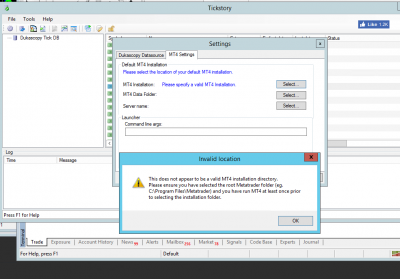
- Error message
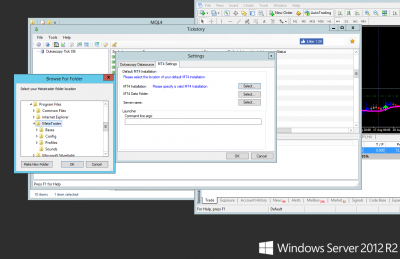
- MT4 Location
Re: Invalid Location - settings for data location
Posted: Wed Aug 22, 2018 11:34 am
by tickstory
Hi LorraineP,
Could you please confirm that you have started Metatrader and logged in before trying to configure it in Tickstory? Tickstory searches for some specific Metatrader files during the configuration that are only created after your first successful MT4 logon.
FYI, this topic is also discussed in more detail on our support forum here:
https://tickstory.com/forum/viewtopic.php?f=4&t=1298
Please let us know if you still continue to have issues.
Thanks.
Re: Invalid Location - settings for data location
Posted: Wed Aug 22, 2018 12:38 pm
by LorraineP
Hello,
I didn't login, as it's not connected to a broker, per your instruction.
Re: Invalid Location - settings for data location
Posted: Wed Aug 22, 2018 12:55 pm
by tickstory
Hi LorraineP,
You'll need to log in at least once so MT4 can download various configuration files from your broker including the symbol list, etc. After this, you can configure Tickstory by pointing to the MT4 Installation folder and it should recognize the folder correctly since it will be able to locate the necessary files. Once configured, you can keep your terminal logged out and use the terminal for your back-testing.
Thanks.
Re: Invalid Location - settings for data location
Posted: Thu Aug 23, 2018 10:40 pm
by LorraineP
Ah Ok thanks. So is it necessary to logout of the account? Or can I stay logged into my broker and run tests?
i.e. will it effect accuracy?
Re: Invalid Location - settings for data location
Posted: Fri Aug 24, 2018 10:36 pm
by tickstory
Hi LorraineP,
It is not less accurate to use it when connected, however some users have issues with their historical data being overwritten by broker data. In such a case, it's better to leave your terminal disconnected and reserve it for your back-testing only.
Regards.